Asynchronous Programming with JavaScript
In this blog we learn about Asynchronous programming,Callbacks,Promises and Async/Await.
Introduction to Asynchronous Programming
In general Javascript execute code in such a way that the code which take some time like reading some data from local filesystem or API's calls are run in background and in the mean time parallel code execution takes place.
Blocking
When a web app runs in a browser and it executes the code which takes more time without returning control to the browser, the browser can appear to be stuck this is called blocking. Lets look to an example-
const getTodo = () => {
    setTimeout(() => {
        return { text: 'Code execution completed' }
    }, 2000)
}
const todo = getTodo()
console.log(todo.text)
In the above code example the todo function return a todo item after 2 sec,And stored in constant named todo so in the last line when we are trying to console todo.text then it return error
TypeError:cannot read property 'text' of undefined .
So why we are getting this error because when getTodo function called it return the value after two second and in the mean time the execution continues and result in error.This is the problem when we are dealing asynchronous program.
Callbacks
Callbacks (in layman language says "Calls me back when u are done") are simple functions which are used to calling instance when asynchronous code block executed and result in ready.
Let's look into example-
const getTodo = callMeback => {
    setTimeout(() => {
       callMeback ({ text: 'Code execution completed' })
    }, 2000)
}
getTodo(todo => {
    console.log(todo.text)
})
Running this code is now give result as Code execution completed
In the above example instead of returning the object we are now calling the callMeback function .As a argument we are passing in the object which should be returned . It is necessary to pass an agument inside an callback function,So in the above code is a synchronous callback as it is executed immediately.
Promises
Now you learn what callback is ,let's understand what Promises is and how it handling asynchronous code easier and more readable.
const getTodo = () => {
    return new Promise((resolve, reject) => {
        setTimeout(() => {
            let error = false;
            if(!error)
                resolve({ text: 'Code execution completed' })
            else
                reject()
        }, 2000)
    })
}
getTodo().then(todo => {
    console.log(todo.text)
})
Callback have drawback that is Callback Hell.Callbacks works great when we have 1-2 async operations otherwise it is hard to debug and error handling to.It also reduces the code readability.
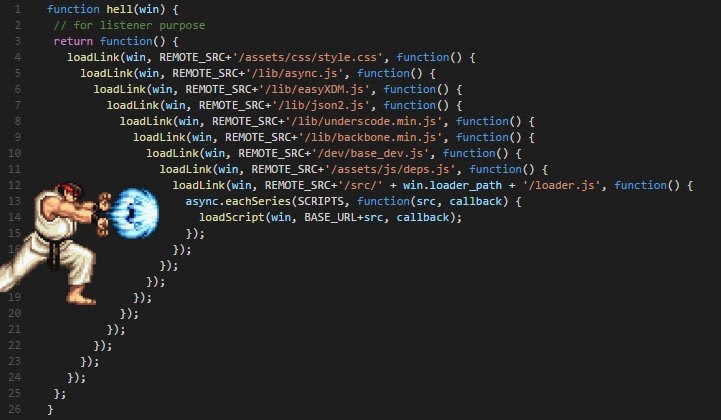
The above code works same as our callback example but with promises.In case the asynchronous code has been executed successfully we are calling resolve.In case of errors we are calling the reject function.
When calling the getTodo function,promise is resolved and then is being handled after this and result in printed "Code execution is completed".
Let see what if we change the value of error to be true ,
let error = true; ,in this case instead of resolve function reject function is called and result informing that the promise cannot be resolved successfully because an error has occured.
In order to handle the rejection of a promise we have to change the code and need to add catch as you can see in the following-
getTodo()
    .then(todo => {
        console.log(todo.text)
    })
    .catch(error => {
        console.log("Error occurred")
    })
The catch function is expecting to get passed in a function which is handling the error state.
Async / Await
Lets look into Async/Await by this the handling of promises is becoming more easier. lets look into example-
const getTodo = () => {
    return new Promise((resolve, reject) => {
        setTimeout(() => {
            let error = false;
            if(!error)
                resolve({ text: 'Code execution completed' })
            else
                reject()
        }, 2000)
    })
}
async function fetchTodo () {
    const todo = await getTodo()
    return todo
}
fetchTodo().then(todo => console.log(todo.text))
In the above code example we changed the way getTodo function is called.A new function fetchTodo is being implemented and the async keyword is used to indicate that this function is executing asynchronously based on Promise.
In the fetchTodo function we calling getTodo using await keyword which indicates that we have to wait for the promise to be resolved or rejected.In the next line todo is being returned,because await make sure that the next line of code is being executed after the promise has been resolved.
Results inCode execution is completed
How we can handle error using async/await.Lets look into example
const getTodo = () => {
    return new Promise((resolve, reject) => {
        setTimeout(() => {
            let error = true;
            if(!error)
                resolve({ text: 'Code executon completed' })
            else
                reject()
        }, 2000)
    })
}
async function fetchTodo () {
    try {
        const todo = await getTodo()
        return todo
    } catch (error) {
        console.log("Error occurred")
    }
}
fetchTodo()
    .then(todo => console.log(todo.text))
    .catch(() => console.log("Error occurred")))
Inside the async fetchTodo function we are using a try catch block to handle error.
Summary
In simple language JavaScript is executing asynchronous code in a non-blocking way which is great to ensure responsiveness of the application.
Thanks for reading this whole blog,All suggestion is valuable and appreciated and i make sure to improve in my upcomming blogs.
